System
Helm: the task system my agents run
Every project I take on becomes a card with an end condition. Slack, email and my own words feed it, one AI agent owns each active card, and a single page puts what needs me on top.

At 7:30 one evening I put an emoji on a colleague's Slack message asking for a fix to our sign-up page. Three minutes later it was a researched task card.
By 8:22 the fix was live, and at 8:37 I closed the card. My whole part was the emoji, a "yes" and "close it."
That's Helm, the task system I built for my work. Three companies run their engineering on my agent system, and on any given day about twenty AI agent threads are working for me.
The hard part isn't the AI. It's keeping track: which jobs are moving, which are stuck, which are waiting on someone, and which need a decision from me right now.
Psychologists put the limit of what you can hold in mind at once at about four things.1 I have more than twenty. So I stopped trying to hold any of it in my head and built a system to hold it for me.
- 141
projects finished in five weeks
- 27
finished per week, up from 11
- 4min
from a Slack emoji to a researched card
- 1hour
from a Slack request to a live fix and a closed card
Before Helm, and after
Before Helm, I merged about 13 code changes a week across my projects. In the 14 weeks since it started, it's been about 187 a week.
Tap a week for the count
Code changes merged per week (merged pull requests)
Helm wasn't the only change that July. I also started running many agents at once, and the climb began a few weeks before the board did. The two grew together: Helm is how one person keeps track of that many agents.
The rules came first
Helm started on July 19, 2026. Before any agent built anything, I wrote down how it would behave.
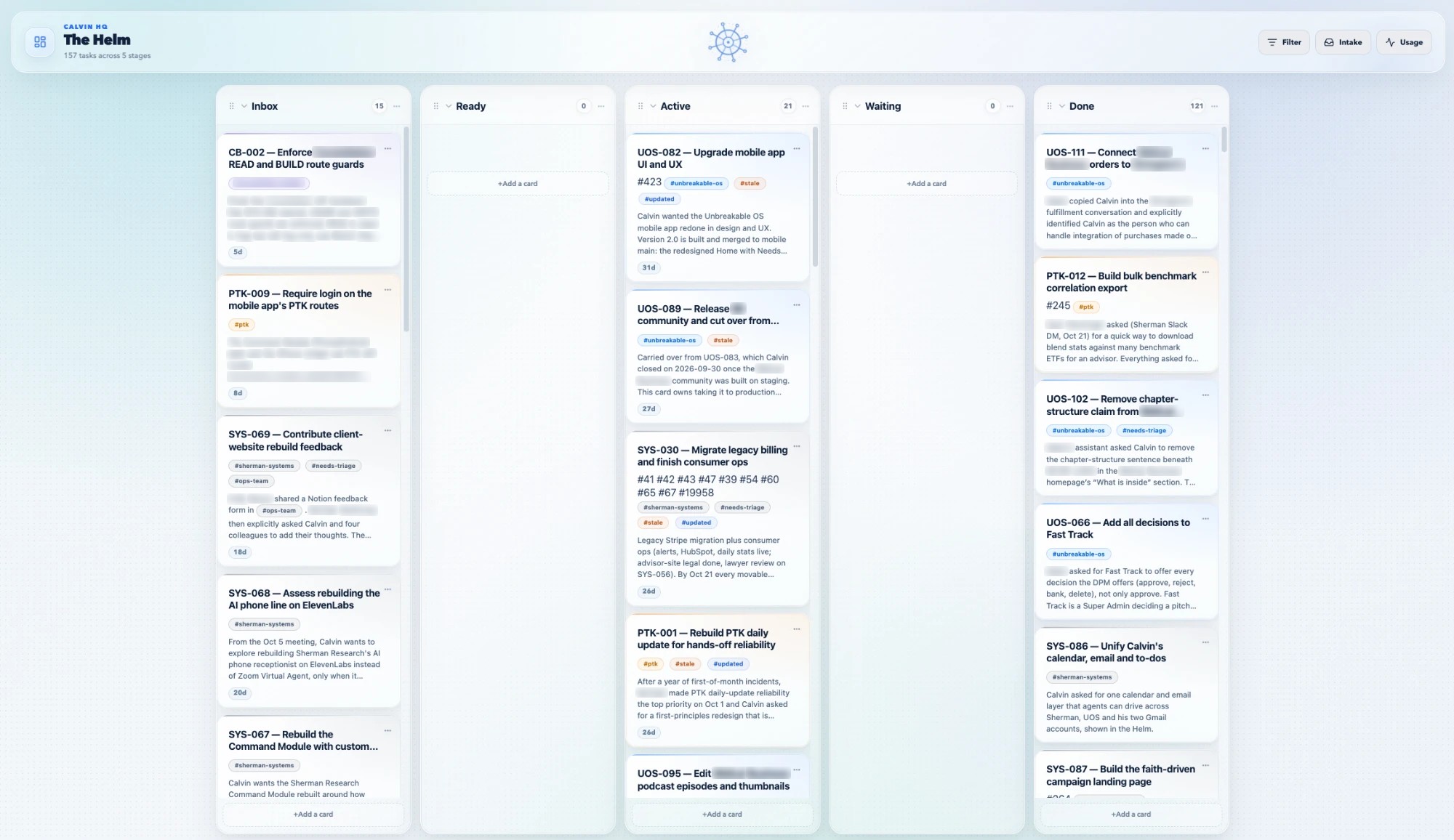
One board. Five columns. The order of the cards is the priority, so there are no priority labels to argue about.
And one rule I built everything around: automation can keep the facts current, but it never decides that my work is done.
None of the background jobs that keep the board can move a card to Done. The one step that can is run by an agent, and only on my word. In the 100 days since, 275 pieces of work have gone onto the board, 240 are finished, and every one was closed on my word, never an agent's.
The second rule shaped everything after it: a card is one outcome, not every action an agent takes. "Fix the sign-up page" is a card. "Run the tests" is not.
A card is an outcome with an end condition
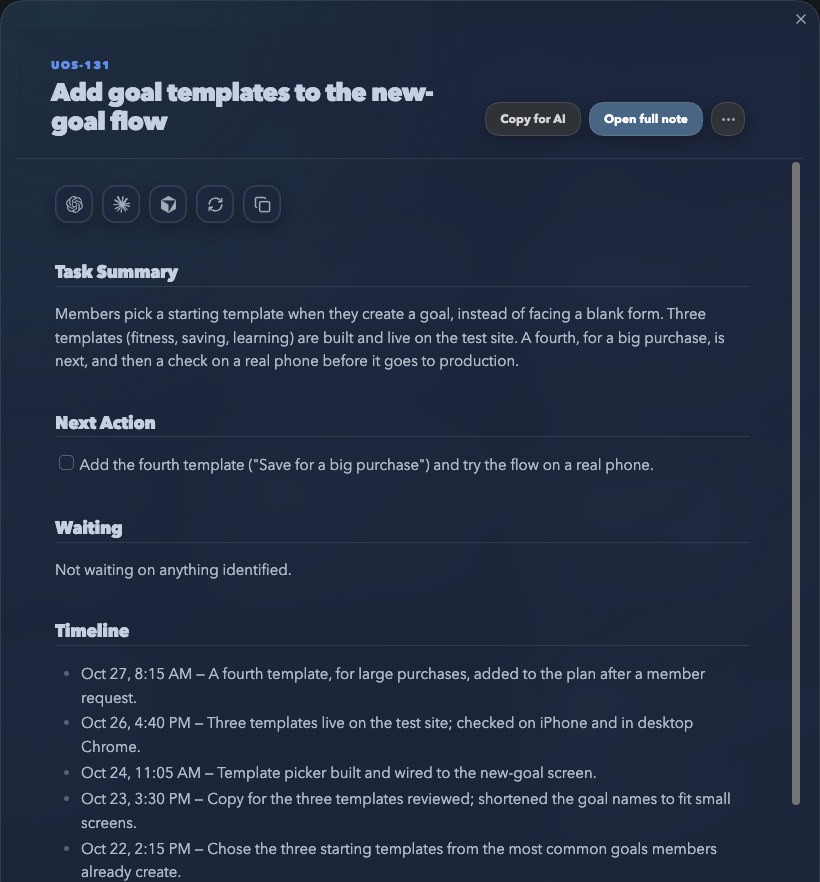
Every card answers the same questions in the same order: what is it, what's next, what is it waiting on, what has happened so far, and what does "done" mean.
- Task summaryThree or four sentences: the request, the goal, where it stands, what's in the way.what I read first
- Next actionOne concrete step.
- WaitingWho or what it's waiting on, by name.
- TimelineEvery move, dated, written by the agents as they work.
- Done meansThe end condition I'll check before I close it.the bar I check
- Research coverageEvery place the agent looked, and every place it couldn't.
- SourcesThe Slack message, the change, the deploy, the screenshot.
- Copy for AIA one-screen briefing that starts with the card's ID. Paste it into a new agent and it's up to speed.
The "Done means" line does more work than anything else on the card. It's the end condition, written before the work starts, and it's the bar I check before I close the card.
An agent that knows exactly what "done" looks like doesn't need me to steer every step. The card also says what the research couldn't check, so I never mistake a gap for a fact.
There's research behind the shape. When people write a specific plan for an unfinished goal, it stops nagging at them and stops hurting their other work.2 Spending under a minute noting where you left off and what comes next frees your attention for the next task.3 Every Helm card carries exactly that: a current state and one next action. The agents write it so I don't have to.
Work comes in without me typing it
I don't type tasks. They arrive three ways, and none of them needs me to retype anything:
- A Slack emoji. I react to any message with 📥 in either of my two Slack workspaces. About four minutes later there's a researched card at the top of my inbox, and the message gets a ✅.
- An email label. I label a message in my Gmail or my work Outlook, and within about five minutes it becomes a card.
- Something I say to an agent. I describe what I want in a thread, and the agent writes the card.
Comes in
Slack, two workspacesEmail, two inboxesSomething I say to an agentBecomes a card
ABC-123 · One outcomesummary · next action · done means · sources · what it couldn't checkGets worked
Code, deploys, checks, draftsDated follow-ups, shown on my calendarIts own row on the Thread DeskMe
Answer, approve, closeonly I can mark a card doneBetween the emoji and the card, an agent has already gone and looked: the code, the email thread, the deploy logs, whatever applies. It's told to treat everything it captures as evidence, never as instructions, and never to claim it searched somewhere it didn't.
Email and calendar follow the same rule: agents do the work, and I approve what leaves. Agents can read and draft in all four of my inboxes from one command, but an email only goes out after I've seen the exact text and said "send it."
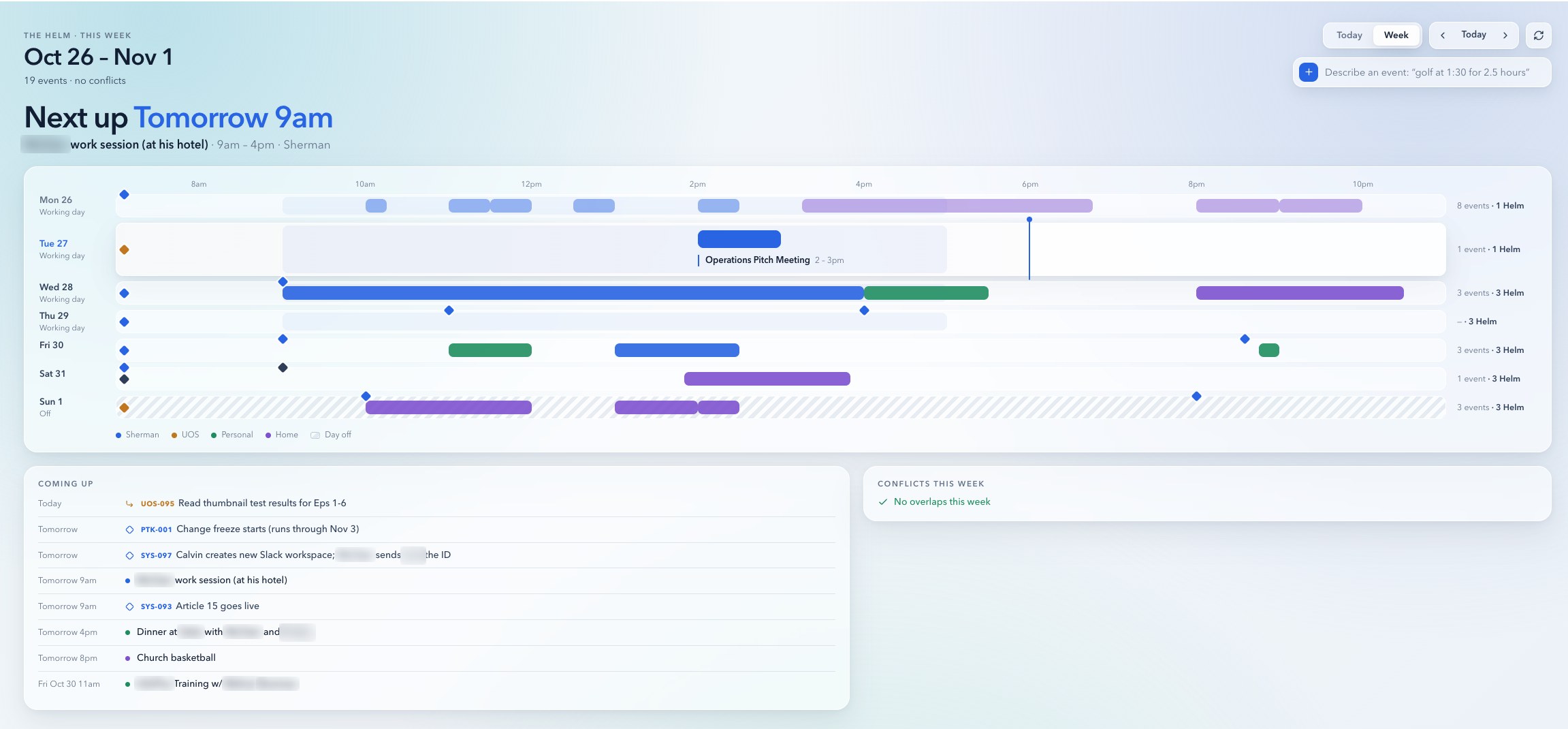
When a card has a real deadline or a scheduled check, it shows up on the same calendar as my meetings, labeled with the card's ID. This morning, 14 of my 20 active cards carried dates.
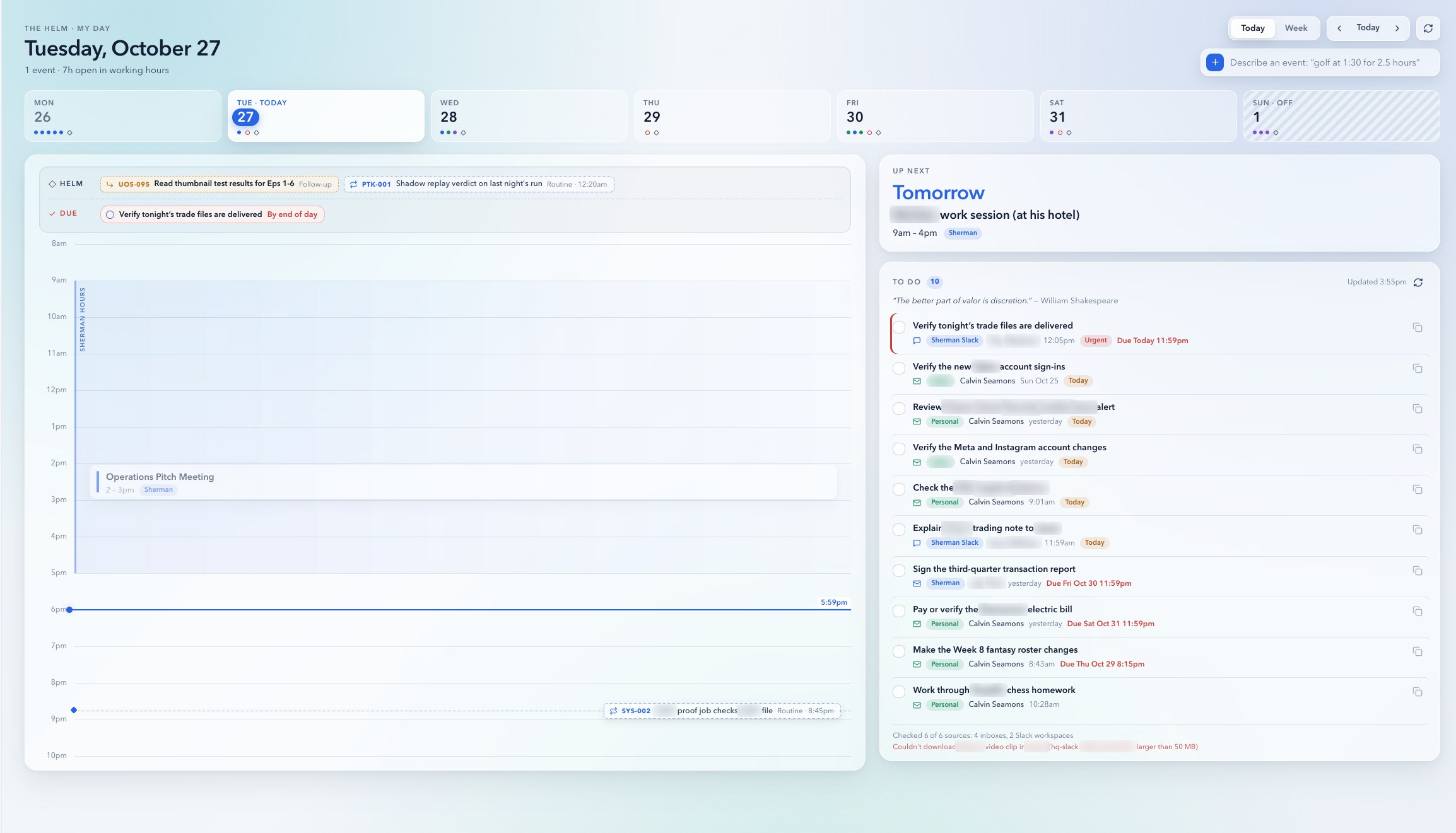
Three times every weekday, an AI with no ability to act reads my inboxes and Slack and writes me a short to-do list. It leaves off anything an agent already owns, so it never repeats a job that's on the board.
One card, one agent
Every active card gets its own AI thread: one ongoing conversation with an agent, pinned to the top of my sidebar so it never gets lost. The thread renames itself to the card's exact title and prints a short block that starts with the card's ID, which is how the board knows which thread owns which card.
It wasn't always this way. At first one thread would often carry several cards at once, and those threads were worse at keeping track of what they knew about each job, and worse at keeping each card current.
So since September 22 it's been one card, one agent. The thread is personally responsible for its card, and everything it learns about that job builds up in one focused conversation. It never has to switch between what it knows about one project and what it knows about another.
That matches how these models work. Anthropic's engineers call it "context rot": the more text a model holds at once, the worse it recalls any one piece of it.4 Their own research system splits work across agents that each start with a clean slate, and it beat a single agent by 90% in their tests.5
It's easier on my side too. Every thread carries its card's name, so picking a job back up means clicking it, and the whole history is already there.
When the work moves, the thread updates the card's timeline. When it needs a date checked, it books its own follow-up, and a scheduled check later wakes that same thread to look.
This makes the thread replaceable and the card permanent. The card holds the memory: what was asked, what's been done, what was verified and what's left. If a thread has to be replaced, a fresh one reads the card and carries on where the last one stopped.
In the five weeks after the switch, I finished about 27 cards a week, up from about 11, and the typical card got done about a day sooner.
Tap a week for the count
The manager and the desk
By early October I had too many threads to check one by one. On October 1 I typed, half to myself: "God, I need this thread to just manage all of my other threads." Five days later I had one.
The manager thread's whole job is coordination. It triages every thread, routes Slack messages to the thread that owns each topic, relays my decisions, books follow-ups and keeps one status page current. It keeps 23 jobs in line so I don't have to.
That status page is the Thread Desk.
Every ticket has the same five parts: its state, one plain sentence on where it stands, what it needs from me if anything, what happens next, and when it was last updated. A ticket only asks me something if an agent truly can't do it and I haven't already answered it somewhere else. I answer right on the ticket, and the manager passes my answer to the right thread.
At first the manager updated the desk itself, and it went stale. So on October 22 I made every thread responsible for its own ticket, updated the moment something changes. Now the desk is current whenever I open it.
Toyota built its factories on a similar idea. Machines stop themselves when something goes wrong and a light shows where help is needed, so, in Toyota's words, "people need only respond when there is an abnormality."6 The Thread Desk is my version of that light.
I don't watch twenty jobs. I respond to the ones that call for me.
Only I can say done
The decision to finish stays mine. These days I make it in two words: I tell the agent "close it," and it runs the step for me.
That only works if the agents can trust that I actually said it. So a "yes" I type in any thread counts everywhere, but only after a small program opens the source thread and finds my exact words.
Messages from other agents, tool output and anything an agent wrote never count. When it can't find them, the rule is simple: don't act, ask me.
What it adds up to
The board doesn't do the work. It makes the work countable, and it lets one person direct a lot of it.
In the five weeks after September 22, I finished 141 cards, 118 of them with proof they shipped: a release, a live page, a published video. Half of all cards close within about two days of being written down.
And because nearly every card has a written end condition, I could have each finished project estimated in skilled hours. That's the 206× experiment.
The fine print
- A card counts as finished when I close it, and sometimes I close several at once.
- Once every thread owned a card, more work came onto the board too. The 118 projects with proof they shipped are the result that counts.
- Time to done is how long a card existed, not hours of effort.
Build your own
You don't need my exact setup. You need the five ideas under it:
- Put everything on one list. If work lives in five places, you'll lose track of three.
- Give every task a finish line. Write the one sentence you'll check before you call it done, and check it.
- Capture without retyping. A forwarded email or a flagged message should become a task in one click.
- Give every task one owner. For me that's one agent thread per card. For you it might be one person, or one AI chat per project.
- Make one page that shows what needs you first. Everything else can wait until it does.
Helm keeps the state of my work. The other half of the skill is reading that state fast enough to move between twenty jobs without losing the thread. That's the art of context switching.
Sources
- Cowan, "The magical number 4 in short-term memory: A reconsideration of mental storage capacity," Behavioral and Brain Sciences, 2001. doi.org/10.1017/S0140525X01003922 ↩
- Masicampo and Baumeister, "Consider it done! Plan making can eliminate the cognitive effects of unfulfilled goals," Journal of Personality and Social Psychology, 2011. doi.org/10.1037/a0024192 ↩
- Leroy and Glomb, "Tasks Interrupted: How Anticipating Time Pressure on Resumption of an Interrupted Task Causes Attention Residue and Low Performance on Interrupting Tasks and How a 'Ready-to-Resume' Plan Mitigates the Effects," Organization Science, 2018. ideas.repec.org ↩
- Rajasekaran, Dixon, Ryan and Hadfield, "Effective context engineering for AI agents," Anthropic, September 2025. anthropic.com ↩
- Hadfield, Zhang, Lien, Scholz, Fox and Ford, "How we built our multi-agent research system," Anthropic, June 2025 (a lead agent with subagents outperformed a single agent by 90.2%). anthropic.com ↩
- Toyota Motor Corporation, "Toyota Production System." global.toyota ↩